Useful Linux Commands
December 11, 2022
commandslinux
List Only File Names
ls -l | awk '{for(i=9;i<NF;i++) printf "%s", $i OFS; printf "%s", $NF ORS}'
Check Public IP
curl ipinfo.io/ip
Change PEM file format from OPENSSH to RSA
ssh-keygen -p -f ~/.ssh/id_rsa -m pem
Start Python Web Server
python3 -m http.server 8000
RDS aurora find and kill lock queries
To figure out data locks :
SELECT ENGINE_TRANSACTION_ID as trx_id, OBJECT_NAME as `table`, INDEX_NAME, LOCK_DATA, LOCK_MODE, LOCK_STATUS FROM performance_schema.data_locks;
transaction :
SELECT * FROM information_schema.innodb_trx ;
kill
SELECT * FROM information_schema.innodb_trx ;
Get count of all Rows from all Tables
first generate DDL query to get count
SELECT CONCAT(
    'SELECT "',
    table_name,
    '" AS table_name, COUNT(*) AS exact_row_count FROM `',
    table_schema,
    '`.`',
    table_name,
    '`;'
)
FROM INFORMATION_SCHEMA.TABLES
WHERE table_schema in ("athena_migration");
then, use below command to get count table wise
mysql -h <host-name> -u <username> -p<password> --skip-column-names --silent < countget.sql
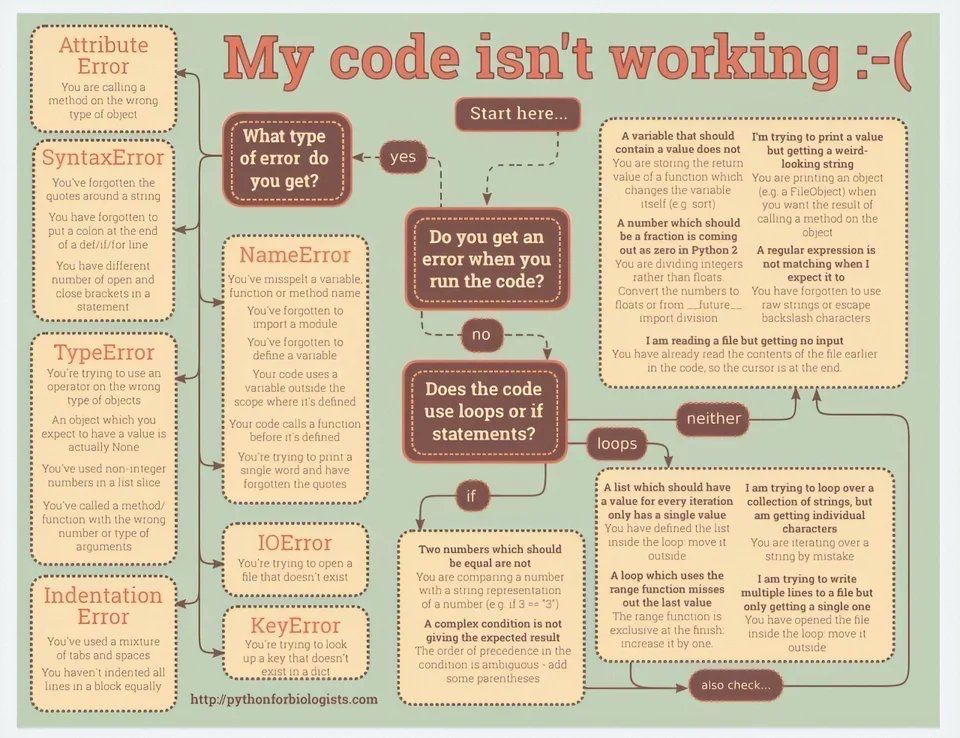
python debug cheatsheet